Your render can take the bus.
A video-generation platform in closed beta, sold by the finished second. Name the most you will pay; the cheapest idle GPU at or under your cap makes the clip. None idle? The job waits.
Request an invite Already invited? Open Studio
Create a Studio account, then enter your invitation code or join the waitlist.
The beta runs one experimental model integration. The models for a commercial launch are still being evaluated. What runs today
BETA Leaves when a GPU at or under the cap is idle
For buyers
Name your fare, then see who would drive
Your cap decides which machines may take the job. Lower it and fewer qualify, so you wait longer. Raise it and you may pay more – never more than the cap. How a job travels, stop by stop
The beta takes 4–15 whole seconds.
Whole cents, as in Studio. UserBus has not published prices; this is the most you would accept.
More detail
Each variant is its own job with its own seed.
- The most this batch can cost
- $50.00
- Per clip, at most
- $0.25
- Video seconds, in 200 separate jobs
- 1,000
Six example machines. At or under your cap: 3 of 6
- $0.02 busy
- $0.03 idle
- $0.04 busy
- $0.06 idle
- $0.08 idle
- $0.11 idle
The $0.02 machine is cheaper but busy, so the $0.03 machine – the cheapest one idle – takes the job. The batch costs $30.00: its rate, not your cap.
These six machines are invented to show the rule. They are not offers, and UserBus shows no live market here. The final charge uses delivered seconds, which can differ slightly from requested ones.
- Measured we ran it and wrote down the date and the machine
- Your number an assumption; change it
- Planned not built yet
Taxi or bus
A hosted video API is a taxi: it leaves now and the meter is fixed. UserBus is the bus: you name the fare and ride when there is a seat.
| Hosted API | UserBus | |
|---|---|---|
| Price | The vendor’s list price per second, fixed in advance. | The rate of the machine that takes the job: often below your cap, never more than your cap. |
| Start | Right away. | When a machine at or under your cap is available. No wait time is promised. |
| Good for | One clip, now. | Batches, many variations, overnight queues. |
Generate in Studio today
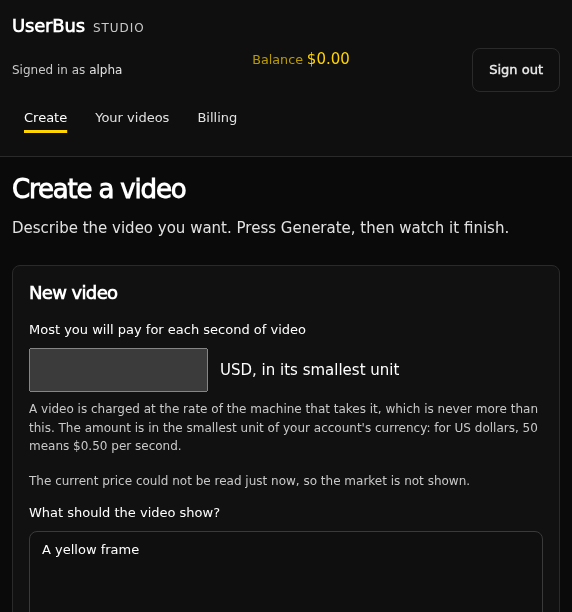
- Create an account with Google, or with an email and a password. Studio is invitation-only: enter your code if you have one, or join the waitlist.
- Enter your cap, write the prompt, press Generate. Under Options: 4–15 seconds, three landscape sizes, a Detail setting and a seed.
- Watch the job go from “Waiting to start” to “Ready”, then download the MP4. A job that fails is not charged.
Request an invite Already invited? Open Studio
An API for your pipeline Planned
Buyer API access and deadline-based tiers are planned, not built. If you generate video at volume, write to us – your numbers shape what gets built first.
For providers
Your GPU is parked most of the day
Run the UserBus worker while you are not using the card and set your own price per delivered second of video. Jobs whose cap covers your price can reach you; the cheapest idle machine gets each one.
Closed beta, for Linux with an NVIDIA card: send a request about your machine; a person reads every request. Our one recorded run is an NVIDIA RTX 4090 on Linux. Payouts are not switched on – Fleet records earnings, but this release moves no money.
How pay works
You earn your rate times the seconds of video you deliver. An idle hour earns nothing: pay is per delivered second, not per hour online. A lower rate wins more jobs; a higher one earns more per job. Your electricity, hardware, wear, tax, cooling and network are yours to pay, and UserBus has announced no platform fee.
We publish no earnings estimate. How many seconds a machine delivers per busy hour depends on the model, and the model for a commercial launch has not been selected. How much paid work there will be has not been observed. Any monthly figure would be invented. How provider pay works
What it takes: Linux with an NVIDIA card, a request about your machine, Google sign-in to Fleet, a worker on the machine, and your rate per delivered second. Apple Silicon is not admitted, and nothing is recorded yet for Windows or for NVIDIA cards other than the RTX 4090.
Questions people ask first
Could this cost less than a hosted API?
The hardware is already paid for and would otherwise sit idle, so a provider’s real cost is mostly electricity. Flexible jobs can wait for that capacity instead of paying for always-on servers. That is the reasoning, not a measured saving: what you actually pay depends on which machines are online and what they ask.
How long will my job wait?
Nobody can tell you yet. It starts when a machine at or under your cap is available. There are no deadline tiers and no promised times today. If you need a clip this minute, take the taxi.
Which model makes the video?
The closed beta runs one experimental model integration, for technical testing. The models for a commercial launch have not been selected and are still being evaluated. We make no claim about output quality, and this site has no sample clips yet. What runs today
Can the provider see my prompt?
Your job runs on someone else’s machine, so treat the prompt as not confidential. The worker keeps prompts out of its logs, the delivered file does not embed your prompt, and Fleet shows providers no prompts or videos – but there is no hardware confidentiality guarantee.
How do I know the machine did the work?
The platform does not take the worker’s word for it. Every delivery is checked on our side – its size, a freshly computed digest, its media type and what the model should produce – and money is only ever charged for a successful delivery.
Can I connect a Mac or a Windows PC?
Not for video today. The only admitted runtime is NVIDIA CUDA on Linux, recorded on an RTX 4090. Apple’s Metal and MLX runtimes are disabled because no run of the model exists on them, and nothing is recorded for Windows.
Next stop: your first job
Studio and Fleet are invite-only. To buy video, create a Studio account and enter your invitation code or join the waitlist. To provide a GPU, send a request about your machine.
Request an invite Already invited? Open Studio Provide a GPU: send your request